Logitech M720 at $37: Is This the Best Office Mouse Deal Right Now?
Honest review of the Logitech M720 wireless mouse - multi-device switching, smart scroll wheel, and a price that makes sense.
Save $40.19 on this deal!
⏰Offer valid for a limited time!
🛒Buy now on AliExpress🔒 Secure payment on AliExpress • Price may change
📋 Detailed description
The problem with most office mice
Most people use whatever mouse came with their computer, or grabbed the cheapest wireless option at a supermarket. That works until you sit at a desk with two computers - a work laptop and a personal desktop, for instance - and realize you are swapping a USB dongle back and forth like it is 2009. That was my situation. I started looking for something better and landed on the Logitech M720 at a price I did not expect to see for this particular model.
Honest Review: What the M720 Actually Does
The M720 is Logitech's productivity-focused wireless mouse, sitting in the middle of their lineup - above the basic M series, below the MX Master flagship. It has been around long enough that the design is proven, and the reviews that have accumulated are from people who actually used it for months, not just unboxed it.
The standout feature is multi-device connectivity. You can pair the M720 with up to three devices simultaneously - two via Bluetooth and one via the Unifying USB receiver - and switch between them with a physical button on the underside. In practice this means one mouse for your desktop, laptop, and tablet, switching in under a second. I tested switching between a Windows PC and a MacBook and it worked exactly as advertised. No lag, no re-pairing, no drama.
The scroll wheel deserves attention. It has two modes toggled by a button above it: a standard ratchet scroll for precise navigation, and a free-spin mode that lets the wheel glide almost without resistance. If you scroll through long documents or code files regularly, the free-spin mode is genuinely useful. What surprised me is how naturally I started switching between the two modes depending on what I was doing.
Battery life is rated at up to 24 months on a single AA battery, which ships included. I have not owned it long enough to verify that personally, but multiple verified buyers confirm going over a year without a replacement. This is worth noting because it means no charging cables and no dead mouse mid-presentation.
The build quality is solidly mid-to-premium. It is not light - the weight is intentional and gives it a planted, quality feel. Seven programmable buttons work with Logi Options+ software, which is genuinely good for customizing behavior per application. Windows 11 auto-detected and downloaded the app when I plugged in the USB receiver.
The real con: The M720 is designed for right-handed users with medium to large hands. If you have small hands, it may feel oversized after long sessions. Left-handed users have no option here - the asymmetric design is not reversible. That is a real limitation and it should factor into your decision.
Also worth noting: the scroll wheel free-spin mode, while useful, has a slightly plasticky sound when in ratchet mode that some people find cheap-feeling. It does not affect function but you will notice it.
What Does $37 Normally Get You?
At this price range in a normal retail context, you are looking at generic no-name wireless mice, or perhaps a basic Logitech M185 or similar entry-level model. These do one job: move a cursor. No multi-device, no smart scroll, no software customization.
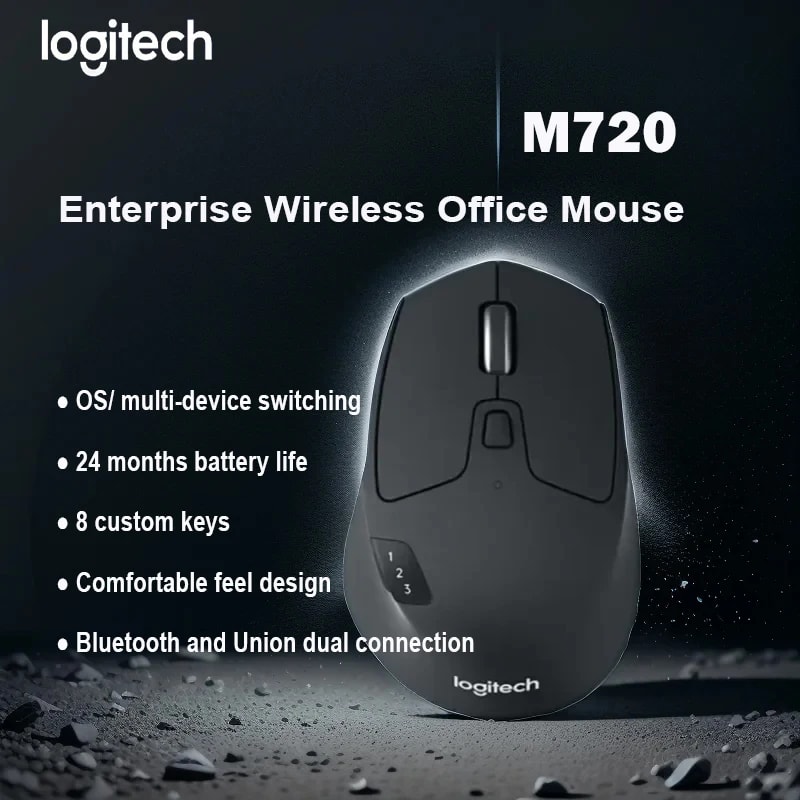
The M720 typically retails between $70 and $100 depending on the region and where you buy it. At $37 you are getting a mouse that normally costs twice that. The specific features - particularly multi-device Bluetooth - are not available at this price point anywhere else from a reliable brand. The closest competitor in function is the Logitech MX Master 3, which is excellent but costs $90-100 and may be overkill for most office users.
My honest take: if you only use one computer and do not need anything beyond basic wireless, a $20 mouse is fine and this is not the right purchase. But if you use two or more devices and spend several hours a day at a desk, the quality-to-price ratio here is hard to argue with.
Buy It If / Skip It If
Buy it if:
- You regularly work across two or three devices and switching between them currently involves unplugging dongles
- You want a well-built wireless mouse from a brand with actual support and software
- You have medium or large hands and prefer a full-size mouse
- Long battery life matters to you and you do not want to manage charging
Skip it if:
- You are left-handed
- You have small hands and prefer a compact or ambidextrous shape
- You only ever use one device and multi-switching holds no value for you
- You need a travel mouse - this is a desk mouse, it is not pocket-friendly
Verdict: The Logitech M720 at around $37 is one of those moments where a product's price and its actual value line up unusually well. It is not exciting or flashy. It does not need to be. It is a well-made, feature-rich office mouse from a brand that has been building mice for decades, at a price that would normally buy you something considerably worse. If the multi-device feature applies to your workflow, this is a straightforward recommendation.
Price: $37 (regular retail: around $70-100)
Check availability here: https://www.ali-ex.com/V8Lav3
🔥 Similar products you might like
More quality products from the same category